
Mounting a television on a wall or placing it on a TV stand can improve your viewing experience and make your living room look organized. However, safety should always come first. An incorrectly mounted TV, an unstable stand, or an unsuitable wall bracket can cause the television to fall, potentially damaging equipment or seriously injuring someone.
Whether you watch movies, sports, or live television, a secure setup is essential. If you use IPTV India services with an Indian IPTV Box, taking time to secure your TV and organize its connected devices can help create a safer entertainment area.
Table of Contents
Wall Mounting vs. Using a TV Stand
How to Mount a TV Safely
Understanding Wall Studs and Wall Types
TV Mount Weight Limits and Compatibility
Anti-Tip Safety for TV Stands
Cable Management and Device Placement
Common TV Installation Mistakes
Frequently Asked Questions
Final Safety Checklist and CTA
1. Wall Mounting vs. Using a TV Stand
Both installation methods can be safe when the correct equipment and procedures are used.
Wall mounting keeps the television off furniture and may help prevent children or pets from knocking it over. However, the wall, anchors, mounting bracket, and fasteners must be suitable for the TV's weight and the wall's construction.
Using a TV stand is often simpler and avoids drilling into walls. The stand must have a stable base, sufficient load capacity, and the correct dimensions for the television's feet. A heavy TV placed on a narrow or lightweight stand can become unstable.
Choose the method that fits your room, wall construction, household needs, and installation skills.
2. How to Mount a TV Safely
Before installing a TV, read the television manufacturer's instructions and the mounting bracket's installation guide. Confirm that the bracket supports your TV's size, weight, and mounting pattern.
Follow these basic steps:
Choose the right location: Avoid areas where the TV could be bumped frequently or exposed to moisture, excessive heat, or direct sunlight.
Check the wall: Identify the wall material and determine where suitable structural supports are located.
Use compatible hardware: Select the specified screws, bolts, and anchors for the bracket and wall type.
Measure carefully: Mark the mounting position and check that it is level before drilling.
Get assistance: Use two people or more, as appropriate, to lift and position a large television safely.
Check the installation: Confirm that the bracket is secure and that the TV is locked into place according to the manufacturer's instructions.
If the wall construction is unfamiliar, the television is particularly large, or the installation requires specialized anchoring, hire a qualified installer.
3. Understanding Wall Studs and Wall Types
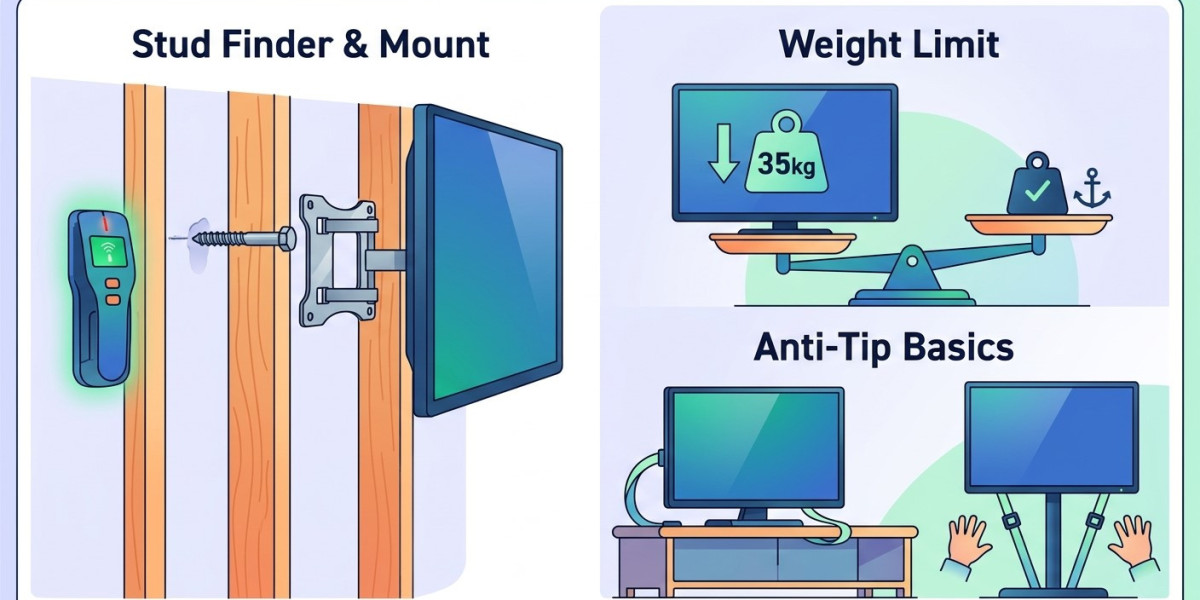
Wall studs are vertical structural members behind many interior walls. For many wall-mounted televisions, securing the bracket to suitable studs provides a reliable attachment when the correct fasteners and installation method are used.
A stud finder can help locate studs, but confirm the locations before drilling. Studs may be made from wood or metal, and each requires appropriate hardware.
Different wall types need different installation methods:
Wood-stud walls: Use the fasteners specified for the bracket and the stud type.
Metal-stud walls: Follow a mounting system specifically approved for the particular metal-stud construction and TV load.
Concrete or brick walls: Use anchors and fasteners rated for the specific masonry and installation.
Drywall alone: Do not assume ordinary drywall anchors can support a television. Use a system specifically rated for the application or secure the mount to suitable structural support.
Never assume that all walls are built the same way. If you cannot identify a suitable attachment point, seek professional advice rather than improvising.
4. TV Mount Weight Limits and Compatibility
Weight limits are among the most important factors when selecting a wall bracket or TV stand.
Before purchasing equipment, check:
TV weight: Use the manufacturer's specification for the television without its stand when wall mounting.
Mount capacity: The bracket must be rated to support the TV's weight and compatible with its dimensions.
VESA pattern: Confirm that the TV's mounting-hole spacing matches the bracket.
Stand capacity: Make sure the furniture can safely support the combined weight of the TV and any equipment placed on it.
Hardware requirements: Follow the specified screw sizes, lengths, and installation instructions.
Do not exceed the lowest applicable weight rating of the mounting system or supporting structure. A bracket's advertised capacity alone does not guarantee that a wall or its anchors can carry the load.
For full-motion mounts, account for the extra leverage created when the TV is extended away from the wall. Follow the manufacturer's requirements for that mounting configuration.
5. Anti-Tip Safety for TV Stands
A television can tip if it is pulled, pushed, climbed on, or placed on unstable furniture. Anti-tip measures are particularly important in homes with young children or pets.
Use these precautions:
Secure the TV to suitable furniture or a wall using a manufacturer-approved anti-tip kit.
Anchor the furniture to the wall when recommended, using hardware appropriate for the wall type.
Place the TV centrally on the stand, with all feet fully supported.
Keep heavy accessories on lower shelves to help maintain stability.
Avoid placing toys, snacks, or remote controls where a child might climb to reach them.
Keep cords out of reach and avoid letting them hang where someone could pull them.
Do not rely on a television's weight or a wide-looking base alone to prevent tipping. Follow the manufacturer's instructions for both the TV and furniture.
6. Cable Management and Device Placement
A safe television setup also includes the devices connected to it. Streaming boxes, routers, power adapters, and HDMI cables should be arranged so they do not create hazards.
Keep cables organized with suitable clips or cable-management sleeves. Avoid running cords across walkways, pinching them behind furniture, or placing them where they can be pulled accidentally.
If you use an Indian IPTV Box, place it on a stable, ventilated surface. Do not cover its ventilation openings or trap it in a tightly enclosed space that can overheat. Keep power adapters accessible and away from liquids.
Use power strips and surge protection according to their ratings and the manufacturers' guidance. Never overload an outlet or use damaged electrical cords.
7. Common TV Installation Mistakes
Avoid these common errors:
Choosing a wall mount based only on screen size without checking weight and VESA compatibility.
Drilling without confirming what is behind the wall.
Using unsuitable anchors or hardware.
Placing a TV on a stand that is too narrow or weak.
Skipping anti-tip restraints.
Leaving cables loose where children or pets can pull them.
Blocking ventilation around streaming devices.
Attempting to lift or mount a large TV alone.
A few minutes spent checking the installation requirements can help prevent costly damage and serious accidents.
8. Frequently Asked Questions
Can I mount a TV on drywall?
Drywall alone is generally not a suitable support for a typical television mount unless a specifically rated system is designed for that exact application. Use appropriate structural supports or a professionally approved mounting system.
How do I know if my TV mount can support my television?
Check the TV's weight, the bracket's rated capacity, the VESA mounting pattern, and the required hardware. The wall and fasteners must also be suitable for the combined load and mounting arrangement.
Do I need an anti-tip kit for a TV on a stand?
An anti-tip restraint is a sensible safety measure, especially in homes with children or pets. Follow the television and furniture manufacturers' recommendations.
Is wall mounting safer than using a TV stand?
Either option can be safe when installed correctly. Wall mounting depends on a secure attachment to a suitable wall, while a stand needs a stable base, adequate weight capacity, and appropriate anti-tip protection.
Where should I place my IPTV box?
Place it on a stable, dry, well-ventilated surface near the TV. Keep its cables organized and ensure that ventilation openings remain unobstructed.
9. Final Safety Checklist and CTA
Before using your television, confirm that:
The mount or stand is compatible with the TV's weight and dimensions.
All fasteners and supports are suitable for the wall or furniture.
The TV is properly locked into its mount or centered on its stand.
Anti-tip restraints are installed where appropriate.
Cables are organized and do not create trip or pulling hazards.
Connected devices have adequate ventilation.
A secure television installation helps protect your household, your equipment, and your viewing experience. Whether you're setting up a new entertainment space or upgrading your existing system, safety should always be part of the plan.
Ready to improve your home entertainment setup? Visit IPTV India to explore your viewing options, and learn more about the Indian IPTV Box for organizing your streaming setup. Make safety your first step toward a more comfortable entertainment experience.